An 8BitDo Switch controller adventure
on
Recently I wanted to play Splatoon on PC using a gyro-based game controller rather than the large and awkward Wii U gamepad. Additionally I needed a replacement for my assortment of controllers in various states of jank and wear. After asking around on Fedi, I ended up ordering an 8BitDo Ultimate 2C BT controller. This decision set me down a rabbit hole of firmware research and hardware modding.
Sidenote: it's bewildering that the Ultimate 2C BT costs $30, while the Switch 1 Pro controller is listed at $80 (minus sales). Does the Pro Controller really work more than twice as well for gaming as a third-party option? (Rumble in Switch games does work significantly better with linear resonant actuators than 8BitDo's traditional motors, as the 8BitDo firmware runs the rumble motors so hard it throws off my aim in Metroid Prime Remastered. I ended up disabling rumble on my console.) I do think that the average third-party controller is dreadful; I had the misfortune of testing SmartTube with a PowerA wired Switch controller, and it's built and feels like a plastic Happy Meal toy.
Using the controller on PC
There's an interesting compatibility matrix for using the controller's functionality and/or gyro input on different OSes.
On Windows, controller support is patchy and depends on OS and app version.
- Dolphin natively supports Pro Controllers connected over USB, but you must select "SDL/0/Nintendo Switch Pro Controller". The "WGInput/0/HID-compliant game controller" option will not work.
- Dolphin's Pro Controller support might've been broken until early 2026; Dolphin 2603 supports Pro Controllers on all my computers, but 2512 doesn't detect them on Windows 10 (only 11).
- If your game does not support the Pro Controller, it may be worth enabling Steam Input.
- Dolphin also detects Pro Controllers over Bluetooth, but I got intermittent signal interruptions (at least on my cheap Bluetooth dongle).
- Opening Gamepad Tester in a browser, the USB controller works on Vivaldi (Chromium), but remains completely undetected in Firefox until another browser/game starts reading the gamepad. Once detected, stick circularity is still incorrect in Firefox.
On Linux, the controller is better-supported, but gyro input requires raw access that's limited due to "security".
- I was able to use the controller over USB in 2D emulators and browsers, since the Linux kernel has a USB Pro Controller driver exposing the hardware as an evdev input device.
- If you want to expose gyro to apps (generally through SDL hidapi) including Cemu and sdl-jstest, you may need to let non-root apps access the controller's
/dev/hidrawN.- This can be done by installing udev rules1 (e.g. ValveSoftware/steam-devices) to
/etc/udev/rules.d/. On Arch Linux you can runsudo pacman -S steam-devices, which installs the rules to/usr/lib/udev/rules.d/. - If you manually install udev rules to
/etc, it's complicated (discussion) how to apply them. I tend to runsudo sh -c 'udevadm control --reload-rules && udevadm trigger'and replug my device, which should always be enough. - There is an issue on systemd to add similar hwdb/uaccess rules for game controllers. They instead added a D-Bus endpoint to logind for the Wayland compositor to request gamepad access, and expected the compositor to expose raw gamepads to games (much like with keyboards). This hasn't materialized so far.
- This can be done by installing udev rules1 (e.g. ValveSoftware/steam-devices) to
«There are no games on Mac», so I tested the wired controller in the Gamepad Tester webapp. Firefox gave a seizure (much like Win32 above), Safari properly detected the controller after I pressed a button, and Vivaldi worked properly from the get-go.
For Splatoon, I tried setting up the controller in Cemu, mapping the controls straight through (minus the touchscreen, though Cemu has a "graphic pack" that binds super jumping to a button combination). I had a bit of trouble getting gyro input to be mapped in Cemu, and had to switch input backends, play with udev on Linux, and reset my keybinds a few times to get it working.
How accurate is the controller? The buttons feel fine overall, and the D-Pad is clicky (opinions will differ, I experience slight thumb-strain but that's the case on many controllers).
While testing the analog sticks in the online Gamepad Tester, I found that both analog sticks produce values slightly beyond a unit vector in the corners, which get clipped at the cardinals.
- I tried calibrating the stick range to produce a more accurate analog sensing response, but could not do so. The controller has no calibration button combo, and Ultimate Software V2 can only install firmware updates on this model (which produced no improvement).
Using the controller on phones
Android devices allow you to control the UI and apps using game controllers. The input stack assumes the Xbox controller layout, using the bottom button as Accept and the right button as Back, even on Switch Pro controllers which label the right button as A and bottom as B.
- It was not possible to remap buttons or UI functionality until Android 17, after which you can swap A/B and X/Y in the controller settings.
- The Switch homebrew Android 15 port has an OS-level hack which swaps the A and B buttons on built-in Joy-Cons and external Pro Controllers. (I have not tested plugging an Xbox controller into a Switch… oh the sacrilege.)
- In games and emulators, it may be possible to remap the buttons even on earlier Android versions.
Using the controller on Switch
The controller works more or less as you'd expect on a Nintendo Switch.
- You need to turn on Pro Controller Wired Communication to be able to use the controller over USB. Otherwise, when plugging in the controller it disconnects from Bluetooth and doesn't work over USB.
- Some people say the official Pro Controller is slightly laggier over USB, and I do not know if that is true for the official or third-party controller.
- The button press or gyro latency might be ~0.5-1 frames worse than a Joy-Con, based on eyeballing slow-motion video footage. I don't have watertight evidence.
- Since it's a third-party controller, the OS will not allow remapping keys unless you install the MissionControl homebrew sysmodule (background process).
Debugging switch bounce in Ultrahand
While using my homebrewed Switch, I started noticing instances where Ultrahand Overlay would often send extraneous button presses when loading between different overlays or games. When opening or closing overlays with A or B, I'd have to quickly release the button so it wouldn't be interpreted as a button press in the game or next overlay. After reporting this bug to the Ultrahand developer, I was told the bug was impossible and nobody else had reported it, but the issue persisted, disappearing and reappearing on its own.
I decided to attach gdb to Ultrahand-based overlays, single-step through the process of loading and unloading an overlay, and look for the point the active game received a double-input. After a series of "oops I returned from the function call" and "should I trace a different event?", I managed to isolate the trigger to Ultrahand calling libnx's hidInitializeVibrationDevices(). But did vibration trigger a button press in the OS or the controller itself?
- One clue was that I couldn't make it happen with official Joy-Cons or the PowerA wired controller, even if it happened on my 8BitDo before and afterward. So it could be my controller handling mode switches incorrectly.
- My options were to do a packet capture over USB, or trace button press handling in the Switch's HID daemon. I quickly ruled out the latter because the Switch OS is based on stripped static binaries with a bizarro syscall/IPC protocol, and reverse-engineering and patching the binaries was beyond my capabilities.
Capturing USB traffic
Joy-Cons communicate by sending packets over wired UART or wireless Bluetooth. Pro Controllers tunnel the same protocol over USB or Bluetooth. I don't know how to wiretap Bluetooth, and decided that USB tracing was more practical (even if still tricky).
- I took a USB-A passthrough breakout PCB from a previous project, and used it to probe the data lines of the controller cable.
- I first tried probing data lines using a cheap USB logic analyzer and Sigrok/PulseView, but kept running into capture failures. It turned out my NUC had a USB stack too unstable to capture at 24 MHz without buffer overflows/underflows.
- I plugged the logic analyzer into a newer laptop, and could get 95% intact USB captures, but still with occasional packet corruption. Even for intact packets, I had no way to export packets to Wireshark and parse out structured information.
- The USB signal was 12 MHz, which the logic analyzer sampled at 1 bit × 24 MHz without locking onto the signal's phase. In the recording, some USB signaling states would last for 1 or 3 samples, and the +D or -D channels occasionally didn't transition at the same sample. The USB decoder was unable to handle these inconsistencies.
- I plugged the logic analyzer into a newer laptop, and could get 95% intact USB captures, but still with occasional packet corruption. Even for intact packets, I had no way to export packets to Wireshark and parse out structured information.
- In the end, I had success capturing .pcap files using tana/pico_usb_sniffer (which I eventually forked so I could
uv runthe capture script with dependencies).- I did not use ataradov/usb-sniffer-lite or its forks. This program captures a limited (though large) number of packets, and prints them as text (hard to parse and analyze further).
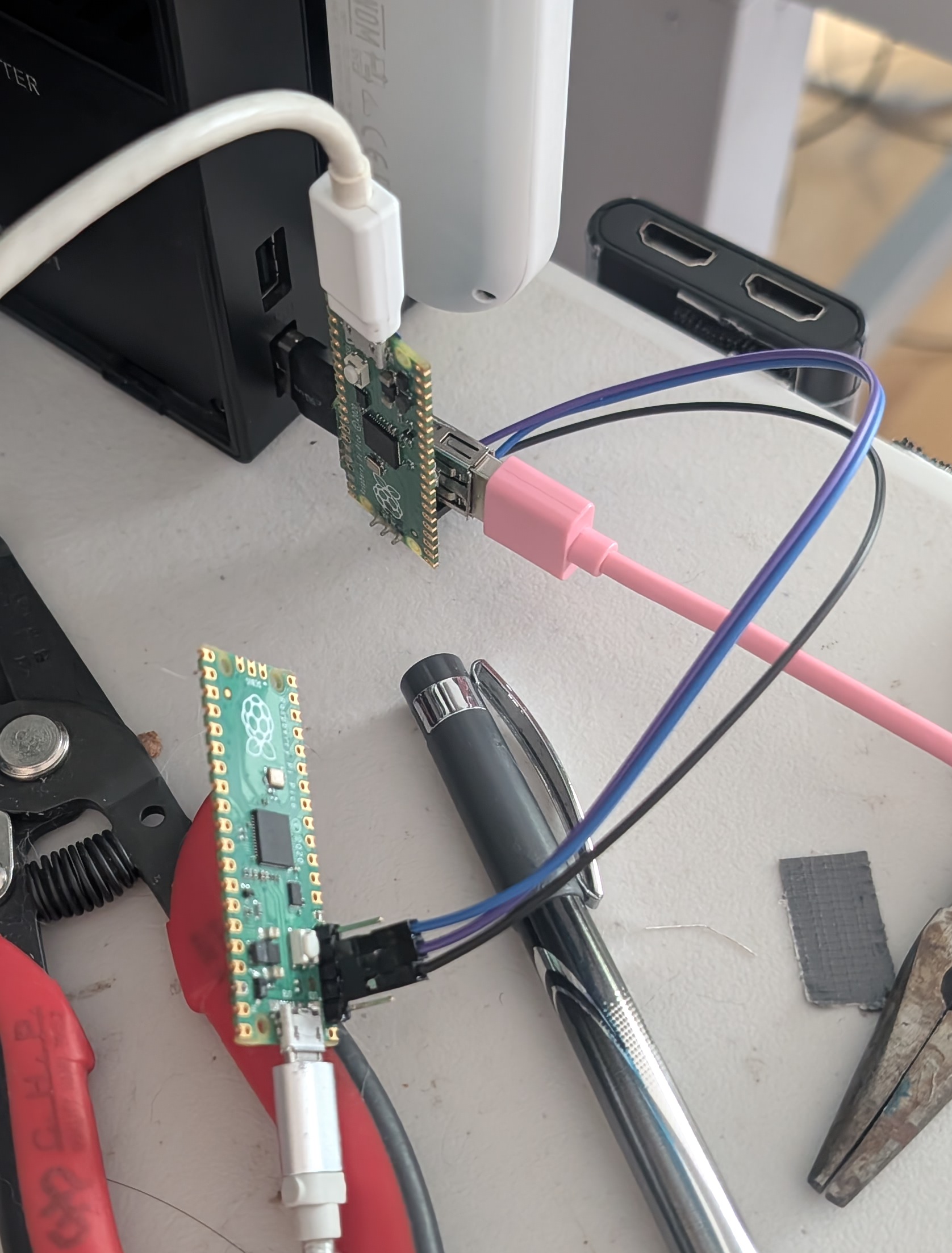
I did run into some problems. pico_usb_sniffer has a known bug where sometimes "the sniffer itself (Raspberry Pi Pico) is not recognized by a PC. If the serial port of the Pico does not appear, plug the Pico into your PC again." I attempted forking and debugging the sniffer firmware, but could not reliably reproduce and diagnose the bug, and lost interest when I finished debugging the controller. It may have been caused by a missing multicore_reset_core1() (which I added in my fork), outdated Pico SDK, or debug/release differences.
Similarly I found that passing -i to filter out packets early (reducing the size of .pcap files) would often hang the USB stream. I tried debugging the Pico firmware but ran into mysterious crashes, until I updated my debugger to openocd[-raspberrypi]-git (the release shipped by Arch Linux is too old and doesn't support dual-core mode). So it seems the debugging crashes were caused by my debugger, and I still have no clue what caused the -i hangs (I finished the project before hitting the issue again).
Parsing USB traffic
In Wireshark, I saw the controller transmit data at around 120-125 Hz (~2 replies per frame). But the console actually polled at a much higher USB poll rate (my PC reports the IN endpoint has bInterval=4 or 250 Hz), while the controller NAKs half of polls non-uniformly, leading to heavy response time jitter.
While learning to read the USBLL packets in Wireshark and pyshark, I came across several websites for the USB protocol2. These websites helped explain the types (PID, Packet ID) of packet, ranging from SOF (background radiation) to IN/OUT (attempted transmissions), ACK/NAK (responses), and DATA0/1 (alternating on each endpoint).
Afterwards I started looking for documentation specific to the Switch Pro controller protocol3. One "project" that saddens me is the vibe-coded steam-pro-controller, and its author suggesting to "point Claude at it". Programming is about building skills, while the usual AI usage patterns build dependence and erode your ability to write code independently.
- And what do you know, one of the commits on the first day was removing a wrong comment, because Claude autocompleted an incorrect explanation based on previous reverse-engineering observations, the Linux driver, etc.
At this point I started writing a program to parse the communications.
- pico_usb_sniffer outputs a .pcap file with USBLL packets rather than the usual USB. This makes looking for help online harder, as libraries like
scapyand online docs do not recognize USBLL packets.- The Wireshark docs say that "Software USB capture captures URBs (USB Request Blocks) rather than raw USB packets."
- As mentioned, scapy could not parse usbll packets. pyshark could, but relies on tshark to output packets as XML, which it would spend up to ten seconds parsing into Python data types.
- pyshark also does not work properly in Python 3.14, and I had to install 3.11 with uv (which causes uv to treat 3.11 as default in future scripts, unless you run
uv python pin /usr/bin/python3 --global). - Eventually I worked out that
FileCapture(display_filter=...)would filter out packets before they're even sent to Python. This meant Python no longer had to spend CPU parsing SOF/OUT/IN/ACK/NAK packets that I'd just discard.
- pyshark also does not work properly in Python 3.14, and I had to install 3.11 with uv (which causes uv to treat 3.11 as default in future scripts, unless you run
I built a TUI using Python and Textual to show OUT and IN packets in two panels side by side. I used arrow keys to scroll through packets in the capture, and the TUI showed the most recent data packet from both the console and controller, while highlighting the current packet in a green outline.
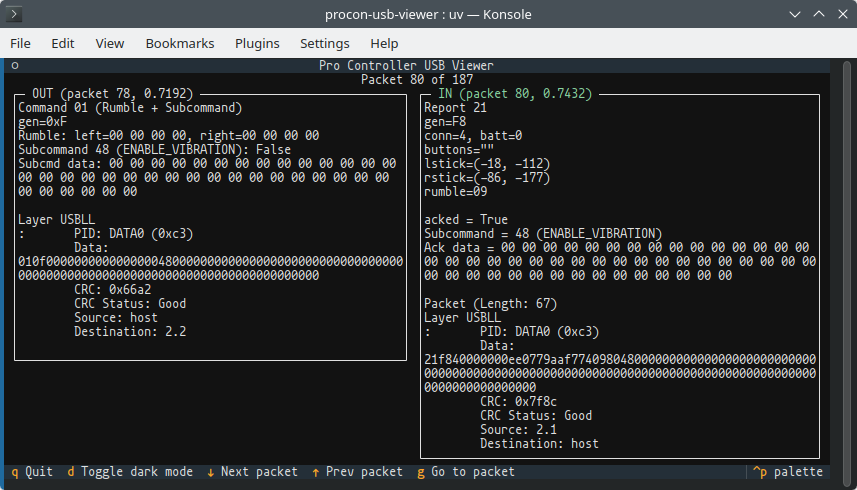
- I referenced existing Switch controller drivers3 to determine the data format of the Switch command and controller report packets.
- I particularly struggled to parse the packed 12-bit analog stick positions. I tried various bit packing orderings, but my stick movement patterns kept producing scrambled values. Eventually I gave in and read the vibe-coded controller emulator's
pack12(). Afterwards I got correct values out, by decoding each stick's 3-byte value as little-endian and extracting bit ranges.- In general LLM output is not knowledge, but the fact it worked as a controller emulator meant that its low-level functionality was at least close to mechanically sound.
- I did not implement visualization of live packet captures. Streaming packets over a named pipe is supported by both pico_usb_sniffer.py and pyshark's
PipeCapture(which Google seems to think is a typo??? has it ever been used?), but it would be substantial effort to glue both programs together, invoke pico_usb_sniffer from my GUI (whether as a subprocess or library), and change my code to support growable packet streams (pyshark doesn't even let you query the currently accessiblelen()of a capture!). And I managed to work out analog sticks and finish my analysis without live capture, so I no longer have a reason to spend time adding it.
I've published my packet viewing tool at Codeberg (nyanpasu64/procon-usb-viewer). Note that it does not work on PowerA Switch controllers, which use Report 0x00 with an abbreviated packet format.
Analyzing controller traffic
Loading the .pcap files, I found that when the controller sends a DATA0/1 replying to the host's IN poll, it normally contains report 0x30 with buttons, stick positions, and 3 sixaxis motion entries. The Switch sends commands to the controller using OUT + DATA0/1 packets.
When the console sends command 0x01 followed by a subcommand (e.g. enable or disable rumble), it expects the controller to reply with report 0x21 with buttons and stick positions, but replacing motion data with the same subcommand ID and response bytes.
The bug was that when the controller replies with report 0x21, it fails to include button state! Instead it outputs a fixed byte buffer with no buttons pressed, a hard-coded battery level, and both sticks off-center.
I found that when I entered or exited Ultrahand overlays (which call hidInitializeVibrationDevices upon entry), the Switch would sometimes send command 0x01 to enable/disable rumble. This caused the controller to reply with report 0x21 (dropping all button presses), then return to report 0x30 with the usual buttons pressed.
- From my testing, seeing packet capture command 0x01 and reply 0x21 correlated perfectly with the Switch seeing an extra A/B press. I'm not sure if games or homebrew only process the latest button state upon each frame; if so, if a button is released and pressed within a frame, the game/homebrew would never see an edge. I know that the
hidshared memory contains a ring buffer of timestamped controller button states, so a game can be programmed to respond to sub-frame edges.
After completing the analysis, I reported the bug to 8BitDo using their support form and email, giving details of the controller protocol and screenshots of the erroneous packets. Over a month later they haven't gotten back to me. To this day the controller double-clicks when switching between Ultrahand menus.
Fixing the jamming sticks
Homebrew aside, after several months of using the controller, I noticed the analog sticks would occasionally get jammed at neutral, and require excessive force to unstick with a click. I'm not sure if this was caused by its factory condition or a previous botched greasing attempt.
It took several attempts of adding and removing grease before I got it into a consistently smooth state, and I was unsuccessful in improving the analog stick's feel until I desoldered and disassembled the module. Desoldering the stickbox was an involved process:
- To remove the stickbox and button legs, I used low-melt solder and an Engineer SS-02 desoldering pump (they now sell the SS-03). One technique I experimented with was to suck out as much existing solder as you can, add low-melt, then suck the hole clean (if possible). This reduces the chance you'll have to use (and consume) multiple rounds of low-melt solder.
- Hot air is another option, but I avoided it because I was worried about melting or cooking nearby components.
- It may be worth looking into a Soldapullt. Some say it's better designed than the SS-02, but I already have a desoldering pump, and even if I wanted to order one there are multiple models and sizes of Soldapullt to choose between.
- One advantage (relative to other controllers) is that the 8BitDo's Hall effect sensors are surface-mounted on the board, and don't need to be removed. Other controllers' potentiometer-style sensors need to be bent away from the stickbox or desoldered.
- The metal stickboxes were not meant to be serviced.
- The white plastic base has small tabs sticking out the sides. They serve two purposes: the outside wraps around the metal to hold both pieces in alignment, and the inside forms ledges butting against metal, preventing the plastic from being pushed inwards too hard and clamping the sensor axles.
- While prying open the metal locking fingers, you'll likely bow the metal shell outwards out of alignment, snapping the plastic tabs off. With the ledges missing, I ended up overtightening the metal and clamping the stickbox too tight around the axles. This produced friction that interfered with gameplay, to the point I had to open the controller again.
- To solve this, it's probably easiest to trim the plastic tabs, so the metal can move outwards freely without breaking off the ledges. It may be possible to clamp the metal to prevent it from expanding while you pry it open... but I am not opening my controller again to check.
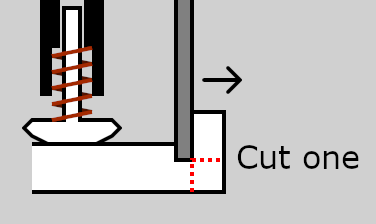
My god GIMP's path tool is a joke for diagramming.
- I think (but am not confident) that jamming happens between the spring-loaded piston under the thumbstick and the molded plastic base of the module. I concentrated on cleaning off grease on both surfaces with isopropyl and a paper towel, and applying a thin coat of new grease.
- I found the choice of grease affects how the sticks feel. My red MAG 1 high-temp lithium grease feels smooth weeks later, while my clear Danco silicone grease with silica filler caused binding. (By contrast, for my Engineer solder sucker, the clear silicone grease produced a noticeably faster pull than red grease.)
- The GC Slickbox guide recommends "Dow-Corning Molykote 44 (Light)", a silicone grease containing lithium soaps. I don't plan to buy it, since it costs $50 for a large tube.
- Even with an appropriate grease, too much grease caused just as much sticking as too little, along with a wet shlicky noise.
- I found the choice of grease affects how the sticks feel. My red MAG 1 high-temp lithium grease feels smooth weeks later, while my clear Danco silicone grease with silica filler caused binding. (By contrast, for my Engineer solder sucker, the clear silicone grease produced a noticeably faster pull than red grease.)
- During reassembly, if you don't tighten the stickbox enough, it may cause clicks to have extra travel distance before hitting the button. If you fully tighten the stickbox and clicks still feel sloppy, you can put Teflon tape between the axle and button.
- When resoldering the stickboxes, I used leaded solder to make it easier to remove again (with less rounds of low-melt). When I bought it, Chipquik was surprisingly cheap for small tubes of solder wire, but not the cheapest choice for low-melt. I hear 62/36/2 silver solder melts better and separates less than 63:37, so I'm using it currently, but I don't know if it actually works better (besides costing more).
If you used an appropriate grease, and knew how much to add (e.g. with a blunt-needle syringe), it may be possible to resolve sticky control sticks without desoldering and disassembling to clean the contact surfaces directly. I don't know how to measure or remove grease without disassembly; perhaps fill the assembly with isopropyl alcohol, move the stick in circles, and watch solvent and dissolved oils leak over the PCB?
Sidenote: The GC/Wii's T3 stickbox was a blessing the industry will never make the mistake of repeating. The plastic stickbox can be removed by unscrewing it from the PCB with zero desoldering needed, and can be disassembled by popping its plastic base out. In Smash Bros spaces, this analog stick design has a reputation for being more robust than previous metal designs. Moreover GC sticks are known to produce minimal sensor inputs when the stick wobbles (due to wear), since the stick wobbles inside the spring-loaded sensor arms, whereas in modern Xbox-style sticks the spring-loaded stick wobbles inside freely moving sensor arms.
Update: Reliability issues
Unfortunately since writing the article I've started experiencing some concerning failure modes. One notable one is a state where the microcontroller's ADCs appear wedged, causing all control sticks to be positioned in a full-scale corner without responding to user input, and the battery level reads as "low battery" no matter how charged the controller is. The face buttons (and triggers?) still function as normal. To exit this state, I've had success by unplugging the controller from USB, then holding the Home button for 5 seconds to power it down. On subsequent startup it will function as normal.
Another issue is that sometimes the controller fails to communicate with the console over a USB cable. Instead, it will attempt to connect to the dock, fail, and retry five seconds later. The controller continues to communicate to the console over wireless Bluetooth, but every time the controller attempts to connect over USB, it stops transmitting over Bluetooth for a split second. I've been able to fix this by unplugging the controller entirely (then plugging it back in if desired).
- The controller also detects USB chargers and power banks as a console, and tries connecting to it with the same result (disconnecting from the console). I've gotten the same issue from testing USB-C power supplies, USB-A ones, and power-only A-C cables.
All in all, the issues so far have been quite manageable, but they cause tangible problems when you connect to an online game before realizing your controller is broken, and have to scramble to repair it under time pressure. But there's an even more concerning problem that I've encountered only once, but made me fear my controller was completely broken.
At one point I left my controller plugged into the dock, and took my Switch out of the dock. The next day, the controller was completely unresponsive to button presses, and even holding the Home button for 5 seconds did not allow me to power it back on afterwards. Assuming it had discharged overnight, I tried charging it over USB, but it drew a constant 25 mA from USB for an hour or so, at which point I concluded the chip was dead. I decided to open the controller to power-cycle the battery and see if any components were visibly failed, but to my surprise after I replugged the battery the controller started up again without a problem! The multimeter showed the battery cable's metal contacts were at 4.1 volts, meaning it had not discharged at all overnight.
I'm not sure what to take away from this experience. Now I know how to solve the "dead controller issue" if it recurs, but I worry it indicates the hardware is damaged and likely to fail within the coming year or two. Only time will tell...
History
- 2026-09-28: Corrected article to say the controller has Hall effect sensors rather than TMR.
- 2026-11-06: Added section on reliability issues.
Footnotes
There are a number of guides to writing udev rules. I haven't researched them in depth, but here are some links I've collected:
- My notes show I consulted Downtown Doug Brown » Linux udev rules while debugging L4T docked display hotplug.
- A Quick Guide to Writing udev Rules – Michael Bergeron
- Writing udev rules
- udev - ArchWiki seems impenetrable.
USB protocol resources:
Switch Pro controller protocol resources:
- The Linux kernel has a Switch controller driver (hid-nintendo.c).
- Switch Dual Shock adapter part 4: Talking to a Switch discusses how the Switch Pro controller's USB descriptors are completely disconnected from the actual format of the data reports.
- "Control your Nintendo Switch with your smartphone" is in Japanese and fed through Google Translate.
- Reddit: "Looking for a fresh USB capture of the Nintendo Switch Pro Controller (full enumeration + initialization)"
- A Reddit link points to a C++ Linux driver, possibly superseded by the in-tree Linux C driver?